I was Wrong about Parallel Decoupling Capacitors!

…and what I’ve learned could help in EMI reduction!

Executive Summary

Having multiple values of capacitors in parallel can inadvertently introduce resonances into a decoupling circuit. These can be mitigated by using a very small resistance in series with each capacitor. Even better, using multiples of the exact same capacitor can be far more effective than the same number of multiple value capacitors.

The effect of having parts far apart on a circuit board, introducing more inductance between them, could also require series resistance to dampen resonances, even if all capacitors are identical. Further, in the case of complex circuits with multiple parasitic impedances, varied capacitances might be appropriate, and series resistance might help to alleviate resonant effects.

These findings do not necessarily apply to non-ceramic capacitors, such as electrolytics or foil. Their equivalent circuits would have different parasitic component range values and should be analyzed for their own effects.

My Long Standing Practice

I’ve been using the parallel application of different ceramic capacitor values for over 30 years, with the intention of noise suppression and decoupling support across a broad range of frequencies. For instance, I’d put down a 10uF tantalum, 0.1uF ceramic (oops 100nF), 1nF and maybe even 100pF, in parallel, at the supply pin of a sensitive analog part. I would arrange the smallest capacitor to be closest to the part, then arrange them successively larger as they were placed successively further away. When impulses occur in the supply draw of the part, instantaneous support would come from the part with the smallest total inductance between the capacitive element and the pin, and that would be the smallest value part nearby. As that source ran out of juice, by that time the inductance to the next nearest part would have been overcome, and there was more support provided by that larger part. And so on. I just couldn’t understand why you wouldn’t do that.

Contrary Evidence

About 5 years ago, a colleague at Morningstar gave me a paper that claimed that it was a bad idea to do this. Being a scientific paper, it didn’t give an explanation in plain English, it went into some advanced derivation that lost me before the end of it abstract… or, something like that. I dismissed it. I kept saying, you have to be able to provide high quality support close to the pin.

Some time later, I realized that I could test the theory with the nanoVNA and real components on a VNA test board.

A setup to measure component S-parameters using a nanoVNA

So I did, and the results were… surprising. Here’s a 100pF 1kV ceramic capacitor (such as we were using in 200V H-bridge stages to reduce EMI), on its own:

100pF ceramic C711U101KYYDAA7317

This plot has the same part and a second plot with a 1n0 1kV ceramic capacitor on top of each other:

100pF_parallel_with_1n0

Holy crap! Explain that bumpity-bump in the response away. I couldn’t.

Should We Care?

Yeah, we should. I mean, the world’s not going to come to an end with a peaky response curve in your decoupling network. However, wherever there’s a peak or an apparent discontinuity, we should be thinking two things:

  • Why is it like that?
  • What impact might it have when everything goes to… well, you know, doodle crap.

It turns out that noise comes at you from all sides, and at all wavelengths. Part of the job of the decoupling network is to suppress this noise. And, what happens when the noise comes in at a wavelength where the decoupling network is less effective / has a higher response on the plot? Well, rather than being suppressed, it gets through!

However, it’s even worse than that. A sharp peak in the response curve implies a resonance, and that’s a bigger problem. It’s kind of like a frequency funnel – it shepherds all of the incident frequencies and kind of pushes them toward the frequency of the peak. Yes that’s right, wherever the sharp peak is significantly above the background, it will bring in noise of all kinds, and kind of push it to the peak frequency. All of that tends to line up the noise in one place, and, well kind of amplifies the noise, rather than suppressing it.

Now, there are two things I need to point out here. It’s not actually amplifying the noise, there are no active elements. It just looks like it might be. What’s actually happening is that it’s gathering the energy in the region and, as much as it can depending on the noise sprectrum and source impedance etc, it will cause it to come out at the frequency of the peak. This is counter to our intention of noise reduction, can be detrimental to the operation of our circuit (e.g. an ADC measuring signals might give bogus results?), and as a foreshadow of later discussion, can cause emissions to bunch up at one frequency, making it show up higher on a spectrum analyzer, and causing an EMI failure.

This revelation to me was all yet to come, when I did those nanoVNA measurements years ago. Over my career, I’ve had issues with EMI, and sometimes it has been difficult to solve… but I think there’s a way to look at it which can help a lot. Maybe some day I’ll get the chance to prove it.

The Video that made Me Look Deeper

Several months ago, I stumbled onto this Youtube video. I resisted watching it for a while, maybe because I didn’t want to find out that I was wrong.

I flagged it as something that I had to watch, but for a few months, just didn’t seem to find the time. Then, a few weeks ago, I did find the time. Hmm… well, it was certainly food for thought!

Hans Rosenberg has a lot of interesting YouTube videos, a lot of great information. I’m not sure I agree with his viewpoint on everything – it’s all true, and watch for extenuating circumstances that change things subtlely.

So, what the F? (Farad)

It appears that the capacitive and inductive elements of one of the capacitors is interacting with the other capacitive and inductive elements in the circuit – here it’s the other decoupling capacitors, below it might be board inductance and parasitic capacitance in large wirewound inductors as well.

Simulation involves Much Less Soldering! And fewer burnt fingers…

I could not believe what I saw, so I coded up my own LTspice simulation to see what he was talking about. Here is the ASC simulation file and the PLT plot file.

How The Simulation is Set Up and Which Networks are Simulated

There are a bunch of various simulations happening all at once in the simiulation linked above. The stimulus is a swept signal from 1 MHz to 1 GHz, with the frequency displayed on the horizontal logarithmic scale. The vertical scale is in dB, so it’s logarithmic as well.

The series impedance into each tested network is 50 Ohms, and a 50 Ohm load on the output. The input would show as 0 dB, so the highest the output can be is -3 dB with the 50/50 divider.

Each “real” capacitor is represented by its series equivalent model of C, Ls, and Rs. These values were “borrowed” directly from the table shown in the video cited above, because I wanted to reproduce Hans’s results.

There are, at present, 18 different networks connected to the same source, each with its own output that can be displayed in the plot window. I suggest plotting mag(V(OutN), so you don’t get confused by the phase plots. The mag() function preserves the magnitude of the signal and sets the phase to zero, so all of the plots result in one superfluous horizontal phase line through the middle of the plot, which is more readily ignored.

Here is a table describing the 18 networks simulated:

Seq Signal Condition
1 Out1 1 x 100nF capacitor equiv model
2 Out2 1 x 10nF capacitor equiv model
3 Out3 1 x 1nF capacitor equiv model
4 Out4 1 x 100pF capacitor equiv model
5 Out5 1 each of 100nF, 10nF, 1nF, 100pF capacitors equiv models
6 Out6 1 each of 100nF, 10nF, 1nF, 100pF capacitors equiv models, each one with approx 6xRs in series
7 Out7 1 each of 100nF, 10nF, 1nF, 100pF capacitors equiv models, each one with approx (10 to 11)xRs in series
8 Out8 4 x 100nF capacitor equiv model
9 Out9 4 x 100nF capacitor equiv model, each one with approx 11xRs in series
10 Out10 5 x 100nF capacitor equiv model, each one with approx 11xRs in series
11 Out11 6 x 100nF capacitor equiv model, each one with approx 11xRs in series
12 Out12 6 x 10nF capacitor equiv model, each one with approx 10xRs in series
13 Out13 6 x 1nF capacitor equiv model, each one with approx 11xRs in series
14 Out14 6 x 100nF capacitor equiv model with varied series inductances added
15 Out15 1 each of 100nF, 100pF capacitors equiv models
16 Out16 1 each of 100nF, 100pF capacitors equiv models, each one with approx 6xRs in series
17 Out17 2 each of 100nF capacitor equiv model, each one with approx 6xRs in series
18 Out18 6 x 100nF capacitor equiv model with varied series inductances added, each one with 11xRx in series

Step 1: Confirmation of the Observation seen on my nanoVNA

00_Basic_Decoupling_Network

Well, would you look at that. This comparison of Out1, Out2, Out3, Out4 and Out5, confirms what my nanoVNA measurement implied – see the bumpity-bumps in the response just below each capacitor’s self-resonant point? OK, let’s call them “resonance peaks”, because that’s what they are. They prove that with real-world values for C, Ls, and Rs, you can derive the result that I saw on the nanoVNA, and that Hans discussed in his video.

Step 2: Dampening the Resonant Peaks

01_Basic_w_Various_Series_Rs

This comparison of Out5, Out6 and Out7 demonstrates that putting a series resistance on each individual capacitor, the “peakiness” of the resonances can be reduced, getting back more to what I was hoping to do in the first place. Now, you can play with different values here, I sync’d them with the Rs of each capacitor, they were kind of hand tuned and I tried to make them values in the E12 standard values in a decade, just my little prejudice about numbers. What you can see is that the series resistance reduces the absolute effectiveness of the network – it’s higher now in the areas of self resonance, where it used to be the lowest – but also knocks down the resonant peaks accordingly. A higher series resistance make the network less effective and less pronounced resonant points.

Step 3: Comparison to a Bunch of Same Valued Capacitors

02_Biggest_one_in_multiples

Here’s a comparison of Out7, Out8, Out9, Out10 and Out11. What you can see is that the least effective network was my hand-optimized widely varied different capacitance value network. Instead of 4 different values, 4 of the same value actually performed better – without series resistance of course, it had a very low response at its self resonant point. With series resistance, its response was much more smooth. Why would you want to do this? Well, it comes back to what Hans said in his video, and something I’ll look a bit into later, that the parts could affect each other similar to how the different valued parts affect each other, if they differ somewhat in equivalent model somehow – different manufacturers, different batches, or whatever.

In any case, then we look at more capacitors of the same value, 5 of them, and then 6 of them, each with the series resistance, and, as expected, 5 performs better than 4, 6 performs better than 5. But, surprise surprise, except at the very top of the range, all options seem to outperform the original 4 different value network, even with resistors to keep them from causing bad resonances.

Step 4: Comparison of a Bunch of Same Valued Capacitors, using Different Values

03_6_up_various_values_w_Series_Rs

This comparison of Out11, Out12, and Out13 seems to show that a bunch of the higher value 100nF capacitors in parallel (again with series resistances) is better almost across the board than the lower value 10nF and 1nF capacitors in the same quantity. What is a bit surprising is that even at high frequencies, where the lower valued capacitor should be superior, the difference isn’t very dramatic. That’s probably because that it’s above the self-resonant frequency, where it’s not so much the capacitance but the inductance that is taking over the part’s frequency response.

Step 5: What Happens if there’s a lot of Board Impedance between the Capacitors?

04_4_up_100nF_varying_inductances

When comparing Out8, Out11, Out14 and Out18, we see that if there’s substantial inductance between otherwise same-sized capacitors, they start to exhibit the “peakiness” of resonance, in spite of being the same value. Putting a resistance in series with each capacitor reduces the peakiness substantially, almost eliminating the resonances. The result is, the effectiveness of the network is reduced, but not as much as you might guess, given the effect without the resistances. Here, the series resistance combats a problem that we may not even know that we have.

Step 6: A Last Gasp at Trying Different Values Together

05_100nF_with_and_without_100pF_and_2_up_100nF_with_and_without_series_Rs

I just had to try this. What if the smaller capacitance is 3 decades smaller than the larger, would they be far apart enough to prevent the peakiness of resonance? Here we compare Out1, Out4, Out15, Out16, and Out17. The idea was that, as the 100nF capacitor poops out near 1 GHz, the 100pF capacitor might pick up the slack, without the interaction between them.

Alas, it didn’t help, there was a strong resonance. Putting a series resistance did help of course, it reduced the resonance, but its effectiveness is still surpassed by two 100nF capacitors in parallel, with the same series resistances, as before.

Could the Resistors be a PROBLEM?

Like, for dissipation? Because they don’t cause a significant problem with decoupling impedance, as above.

Well, let’s see. What frequency are we talking about that could have significant energy… maybe 40 kHz, with a 150 Vp-p waveform (say). The worst case current would be in the 100 nF capacitor. So at 40 kHz, Xc=40 Ohms, so the current could be 2.7 Arms (3.8 Ap-p). With a resistance of say 200 milliOhms, this resistor could dissipate 1.4W.

This power is substantial, but the number seems high. It’s best to recalculate for your own proposed design, and then try it to see what the dissipation might be.

What’s the Bottom Line?

This does not suddenly make me a decoupling / grounding / EMI expert… and what I’ve done strongly suggests that you should try multiple ceramic caps of the same value across EMI areas of concern first (like in your high power H-bridge circuits, hint hint).

If the board design places ceramic capacitors significantly far apart from each other on the PCB, consider putting the small series resistances in series with each, to ensure that they don’t resonate with all that parasitic inductance between them.

And for those circuits with a bunch of parasitic impedances that are going to be unknown and vary from unit to unit (power conversion with big switch FETs and power inductors on wire leads, say), it might still be appropriate to put down multiple values at different places, in case you need to compensate both for weird capacitances and inductances showing up where you don’t expect, and board distance impedances. If you do have multiple values, put a small series resistance in series with each one. I might suggest finding the actual specified internal series resistance Rs for each type of part, and use some small multiple of that value.

Other types of capacitors, such as electrolytics and film capacitors, may not exhibit these effects. Their equivalent circuits would have to be studied and tested to see if they suffer from the same effect. You especially would not want to put a series resistance on a large bulk storage capacitor (like on the output of your power conversion system), because the current flowing there will be very substantial, the power loss would be significant, and it could seriously degrade the bulk storage performance.

Do Not Trust Caller ID!

Most of our phones will helpfully display the telephone number or even the name, for incoming calls. This is a great help. You can often avoid telephone solicitors, for instance sending “Annoying Surveys Inc.” to voicemail. You can prepare your greeting, greeting an office colleague more formally than an old college friend. Unfortunately, you cannot blindly rely on the number and name displayed.

With Great Power…


Internet telephone technology, most often Voice over IP (VoIP), is an amazing low cost innovation that many people and businesses rely upon to save money, make easy inter-office phone transfers possible, allow for simultaneous ringing of phones at different locations worldwide so anyone can pick it up, provide flexible services like “find me anywhere”, and much more. Unfortunately, a powerful technology with a lot of cool features can often be misused by a bad actor, so VoIP can be misused too.
This technology can be accessed by anyone in the world. Bear this in mind, the next time you get a call from, say, Oakbank, by someone with a strong accent. They might be recent immigrants, or they may actually be on the other side of the world.

Telephone Number Spoofing


When making an outgoing call, an Internet phone must tell the phone system what its telephone number is. It can say anything, for instance the number of the local Royal Bank branch, the office of the Prime Minister, or anybody else. Your phone uses the phone number to look up the name, and will dutifully show “Royal Bank Unicity” or whatever on the screen. If you call the number back, you will get to the real Royal Bank office, so that’s helpful, but read on – you can’t rely on this either.

A Local or Toll-Free Number from Anyone, Anywhere


Using an Internet phone, anyone in the world can get a phone number in any state or province, even a toll-free number. It doesn’t cost much, maybe $5 initially and then something like $3 a month. A misleading name can also be assigned, maybe with typo errors that might fool you into thinking that it’s a local business or official office. For instance, using the number “1” instead of the letter “I” in the name “MP1C”. In this case, someone can call you claiming to be from MPIC and you might believe them! If you call them back, you are calling the number that they own and use, and you will get back to the fraudulent person.
This is often what is at the heart of the “you owe back taxes and will be arrested” scam calls. The fraudster gives you a trivial bit of publicly available information in an attempt to convince you that they are the IRS, CRA or RCMP, telling you that you owe money and must pay immediately. They may have you call them back on the same number, or give you a 1-800 number to call them back on. Don’t do it! The fraudsters own that number, and are just waiting for you to take the bait.

Are Text Messages More Trustworthy?


The same technology that empowers VoIP can also be used to send text messages, so, sadly, they can’t be fully trusted either. Text messages, also known as Short Message Service (SMS), were implemented with the original mobile phones. Fortunately, although it’s not unheard of, it’s not easy to spoof an SMS message, so it should have the correct phone number on it. In most cases, a name is only displayed when it’s in your personal telephone book, so it’s easy to see which messages are from people you don’t know. However, it’s a very old system dating from the early 90s and doesn’t have great security, so don’t rely on it to be completely private.
Someone who signs up for a local or toll-free phone number can generally send SMS messages to and from the same number. For instance, in the example given above, “MP1C” can make calls, take calls, and send and receive SMS messages. So, don’t necessarily trust someone who calls you and then sends you a text message from the same number. That is trivially easy to do.
Other than this, the biggest risk of an SMS is that you click on a link or download a doctored image or audio message that causes a problem on your phone. Always be suspicious of links in SMS messages, especially if it comes from a number not in your address book.

What You can Do to Protect Yourself

  • Have a healthy skepticism of all incoming calls. If someone calls you and asks for sensitive personal details, like birthday credit information, it’s best to tell them you are too busy, then call back at the official number for the business or government agency.
    • Further to this, when looking up the number of a business or government agency, don’t just search the name and take the top number on the list.
    • Fraudsters can “game” the search engine order and sometimes can make their results appear at the top!
    • It’s better to go to the web site of the actual bank or agency and find the “contact us” information there.
    • In the case of a bank or credit card, always use the number on the back of your debit or credit card, or from an official statement.
  • Never click on a link in an SMS message, unless you are sure that you are sure that you know where the message came from. Again, if you are suspicious, look up the business or agency that it purports to be from, call and confirm that the message is from them.
  • UPS, Fedex, Canada Post and the US Postal Service do not generally send messages by text.
    • If you receive a “we cannot deliver the parcel” message, think about whether you are expecting a parcel first.
    • Is there any other way to confirm which parcel it might be? Can you check with the post office and see if there’s an issue? Why would there be an issue?
    • Be suspicious, it’s safer to be that way, even if it might be less convenient!

So Your Office wants to Use VoIP, eh?

The Telephones, They are a Changin’


Back in the 70s and earlier, offices were served by a system with the telephone company providing all the connections, and forcing the use of their equipment. In the office where I worked, it meant 4 separate lines, and every phone had four lighted buttons. If a button was lit, that line was in use. If you pressed a button for a lit line, you joined the call. If you put a line on hold, the button would blink.

In the 80s, more and more companies installed their own private telephone switching systems, or PBXes. This allowed the customer to rent a fixed number of lines that came into their own equipment, and their equipment would divide up the lines, manage directing calls, sharing calls, and optionally policing what kind of outgoing calls could be made.

Plain Old Telephone Service


All of these implementations were referred to as “Plain Old Telephone Service” or “POTS”. In fact, even today, what are referred to as landline telephones, are often implemented as POTS at the customer’s site, even though some high tech network method brings it to the home (for instance, fibre optic cables). FAX machines are a good example of devices that almost always use POTS. In fact, where digital phone networks are in place, a device called an “Analog Telephone Attachment” or “ATA” can be installed to connect to a POTS device.

The Rise of VoIP


In the 21st century, a new technology called “Voice over IP” or “VoIP” came onto the scene. The idea wasn’t new, it’s simply digitizing audio and putting it over data networks. In fact, the telephone companies have been doing this, at least conceptually, in various ways at least since the 50s, including using “frequency division multiplexing” or “FDM”. With the rise of the “Internet Protocol” or “IP” in the 70s and 80s, and the rapid expansion of such IP network capacity in the 90s, the Internet now has the capacity to reliably carry many individual telephone calls… hence the popularity of VoIP.

Use of VoIP


Generally, VoIP is just like POTS. It differs in the way that the sound gets transferred between the end points. In IoTS, the sound is converted to digital messages that are put out over an IP network, often (but not necessarily) the main Internet itself.

Enter VoIP


VoIP comes in several different flavours, each providing a mix of features and capabilities. Sometimes, VoIP is implemented directly from one computer to another, but more often, some kind of exchange is used. This allows a VoIP user to contact any one of the other users on that same exchange.

More often, users of VoIP phones want to connect to regular telephones. For that, a gateway is required. Sometimes even the telephone company will provide such an gateway. Others are available, often for astoundingly lower cost, such as the one I use, VoIP.ms.

Relaying a Call to a “Regular” Telephone


It is possible to have a VoIP system transfer or relay the call back to the POTS system and ring an actual phone number (mobile or landline). Note that when a VoIP system relays a call, you will pay for both the incoming call and the outgoing (relay) call – each one might be pennies per minute, but if it happens often and lasts long, it can add up.

VoIP Reliability


VoIP can only be as reliable as the data network it communicates over. If that data network goes down, there is no VoIP. If the connection is critical, for instance, for emergency calls, then each and every link in the network chain must be backed up for loss of power and potential disconnection (for instance, broken wires or underground lines dug up).

POTS Replacement


Traditional telephone companies have spent over a century improving their reliability, for instance putting battery backup in all telephone exchanges so the POTS system can work for days with the power out, and providing redundancy on links between exchanges. Our residential Internet service is generally not battery backed up, and therefore often is lost during a power outage.

Mobile VoIP


You can use VoIP to a mobile phone, using its data service. Here again, the VoIP is only as reliable as the data service. If the mobile phone is turned off, out of the service area, or in a “mobile service dead spot”, then there will be no VoIP service.

Note that sometimes data service will fail before actual mobile phone calling – so it may be possible to dial out using the phone (3G/4G/5G/CMDA etc) even though VoIP does not work.

Similarly, it may be possible to have the VoIP system transfer or relay the incoming call to your regular mobile phone number if VoIP is not functional.

Consult with Professionals


For these reasons, be careful in the implementation of VoIP where emergency calls are likely to be made, for instance with the elderly or those often requiring advanced care. Consult with professionals who specialize in telephone service. These days, the telephone company will often offer VoIP services, and they will understand this issue well.

Cost


For those who are used to the cost of a telephone company landline, the low cost of VoIP.ms can be astounding. For as low as 3 dollars (US) a month, you can move your landline number to VoIP.ms. One downside is that generally you have to pay for every minute of outgoing and incoming calls, but that cost is generally in the 1 to 2 cents a minute. It’s difficult to run the bill up past 5 or 10 dollars a month!

Interesting Possibilities


Some VoIP systems will allow many phones to ring at the same time, even very far apart, in an effort to get someone to answer a given call. The rules for which phones ring, and when, can be complex. For instance, this can be used in an office setting, where maybe some incoming calls, like from known clients in a database, will ring all customer service advisors at one time. If nobody picks up by the end of the second ring, subsequent rings can be made to every phone in the office.

Multiple Locations


Even more interesting, phones in another location can ring. For instance, if a company has multiple offices, all phones for all service advisors can ring… or ring twice in the local office, then the rest of the rings worldwide. Calls can be routed to different places at different times of the day or night. The possibilities are endless, depending only on the exchange software used.

Finding You Whereever You Are


If you have a desk telephone with an assigned external number (referred to as “Direct Inward Dial” or “DID”), then with some VoIP systems, you can have your desk telephone, your computer, and your cell phone all ring at the same time, allowing you maximum flexibility. If you are away from your office, in an airport or coffee shop, you can take the call.

VoIP End Points / Telephones / Clients


What would be called a telephone handset in POTS, can actually be many things in VoIP:

  • An actual telephone device or something that looks just like a telephone, in which case you might call it a VoIP telephone or VoIP handset.
  • An answering machine, automated attendant, or artificial intelligence receptionist, in which case you might call it an end point.
  • A program on a computer or mobile phone, in which case you might just call it an application or simply a client (as in client on the VoIP system). This is often called a “softphone” program.

In any case, each has slightly different character and options. I will use the most generic term “end point”.

Our company uses Dialpad, which is both a company providing an exchange and connection to POTS phones, and provides a softphone that appears to work well across VoIP handsets, computer and mobile phones.

VoIP Desk or Wall Mount Telephones


This type of an end point looks like a traditional telephone, but instead of a traditional telephone jack, it will have a network connection. Inside, it can be far more complex than a traditional telephone. I have used the Grandstream GXP1620, and can recommend it. These phones can be used very much like a traditional telephone, with all the features you would expect, and more.

In the office setting, there are extremely fancy VoIP desk phones. These actually look like small computers, and can be confusing to use. Just because a company can put fancy features into a phone, doesn’t mean that they should!

Real Traditional Desk or Wall Mount Telephones


A real traditional telephone can be used with VoIP, using an analog adapter. This adapter has a network connection on one side, and one or more POTS telephone jacks on the other. I have used the Grandstream HandyTone 286 and Grandstream HandyTone 486, both of which work very well.

The POTS jack on the analog adapter could theoretically be connected where the traditional telephone company’s wires come into a residence, thereby allowing the use of all the original telephone jacks around the house. This works well, as long as the number of telephone sets connected do not exceed the ability of the analog adapter to drive them with enough power. Be careful and test the setup – it can take too much power to ring old “analog” POTS phones.

Be sure to disconnect the telephone company connection before connecting the analog adapter to your in-house wiring. If you fail to do so, you may cause the telephone company trouble, and they will charge you money to fix it.

The Computer as a Phone


There are many softphone programs that you can run on your computer. Generally, this would require the use of a headset attached the computer (using speaker and microphone is generally bad office etiquette). A good quality headset is recommended, I have found the Mpow 071 USB Headset to be inexpensive (less than 30 dollars US) and good sounding, although be careful with it – it can be a bit fragile.

Softphone Programs on Computer


In an office environment, use the softphone recommended by the company.

In a personal environment, look into these, in no particular order:

  • Zoiper – I found Zoiper cumbersome to use, although many love it.
  • Linphone – Linphone is rudimentary and lacks features, but worked well for me on MS-Windows and Linux.
  • 3CX – 3CX did not work well for me on Linux.
  • MicroSIP

As always, your mileage may vary. There are lots of lists of programs online.

VoIP on the Mobile Phone


There are lots of softphone apps for your mobile phone. Be wary of the app lists online – many include not-really-VoIP programs like Skype and WhatsApp, and mediocre or scam-filled apps as well.

Check Your Android Device, May Have Softphone Built In!


Earlier versions of Android had softphone capability built right in. This has the advantage of allowing the choice of using VoIP to dial out by default, or asking on every call. It also provides full integration with the phone’s address book, although other applications can sometimes do this as well.

Start the dialling program, touch the three dots in the upper right to drop the menu, select “Settings” and then “Calling Accounts”. If the option “Add Calling Account” exists, use that to add your VoIP system.

Softphone Programs on Android


In an office environment, it is generally best use the softphone recommended by the company – unless you consider yourself an expert!

In a personal environment, look into these on the official app store for your device, again in no particular order:

  • Zoiper IAX
  • OpenPhone
  • GroundWire
  • Bria

In this case, I have no recommendation. It turns out that I used some of these programs long ago, but each one had some shortcoming that I could not fix. They may well be better now!

Again, your mileage may vary, and there are lots of lists of apps online.

Sound and Call Quality on Mobile Devices


Like most modern mobile phones and digital TVs, the call quality on VoIP is quite good. It can vary depending on the technology used in converting the voice to and from digital, but it should be at least as good as a POTS phone. However, like modern mobile phones and digital TVs, as they get poorer and poorer signal, sound will get weirdly garbled, choppy and distorted. This may happen even when you do not expect it, since the mobile data signal can vary rapidly from area to area, or even block to block.

You would not notice your Spotify or other streamed audio have trouble, because they are not operating in real-time. For instance, Youtube will often save up to a minute ahead on your device, so it can keep playing without interruption if data is completely lost. They are assuming that the data connection will be re-established within 30 seconds or so, then just start storing more, and you will never hear the difference.

However, for telephone conversations, we expect the sound to be available instantly, or at least within a very small fraction of a second. A few tenths of a second of delay can make it impossible to carry on a conversation. Telephone call audio is considered real-time. If the data gets delayed by a tenth of a second, it is just thrown away, because it hasn’t arrived in time to be useful.

This becomes important when we have a weak or intermittent data connection. The real-time requirement of the voice data means that lost data can’t be easily replaced, so depending on how the softphone deals with the missing or late data, the result can sound awful. Do not avoid VoIP for this reason, just know that when it happens, the mobile device is not broken, it’s probably the poor data connection.

VoIP Data Usage on Mobile Devices


Since the voice sounds on VoIP are converted to data and sent over the Internet, use of VoIP can eat into your monthly data allocation. If your mobile device is using local WiFi, then the VoIP data goes out on that, and doesn’t go on your data plan. However, in the absence of WiFi, then your data plan will be used by VoIP. The amount of data consumed by VoIP per hour depends on different factors, including the CODEC that the phone uses. A CODEC is the method that the sound is CODed into data and DECoded back to sound. There are many CODECs in use, some of which are faster, some of which use less power, some of which give better sound… but generally we just use whatever the default is for the softphone we choose. A brief review of available literature indicates that, in the worst case, a constant phone call over VoIP might use 30 to 400 megabytes per hour. In fact, you will probably find it to be a lot less, this is absolute worst case. For most people, unless they talk using mobile data for hours and hours a day, there will be no issue… but it’s not zero.

Battery Life for VoIP on Mobile Devices


In order to be able to receive calls at any time, the VoIP Softphone will generally contact the main VoIP server constantly. This eats some extra data on the data plan (although not that much, maybe a megabyte a day), but the bigger issue is its power consumption.

The computer chips at the heart of mobile devices spend most of their time in deep sleep, consuming as little power as possible. Those chips only transition to active mode when there is work to be done, like when the phone provider tells it to ring and advise you of an outside call, or when periodic check says there is a text message, or when the user is shaking, touching, or interacting with the phone in some way. Of course, there are degrees of operation, so the power consumption can vary depending on whether WiFi or Bluetooth is running, how bright the screen might be, and other factors.

When a program such as a VoIP Softphone is constantly running and checking for incoming calls, the chips don’t get to go to sleep… sometimes they never get to reduce power, consuming power at a significant rate, causing the battery to run down quickly.

Push Notifications


Most devices are on charge most of the time, and mobile batteries should be kept as close to full as possible to prolong their life, but it is important to know that the battery won’t last long when off of the charger, unless you can configure the softphone to use push notifications.

A push notification is a message that comes down, unannounced, from the server, waking up the softphone program and advising it that there is a call or message. If the server and softphone that you use can do this, then the phone can go back to spending most of its time in deep sleep, regaining your battery life. Push notifications are used by other programs like WhatsApp and Messenger for this reason.

Not all servers can do push notifications, but most of the big commercial servers can. Not all softphones can do push notifications, ask or check to see if they will.

Information You need to Set Up Your VoIP Phone or Softphone


There are three key pieces of information that are required to set up a VoIP phone. Extra features, high security, complicated networks (for instance, behind firewall or router) can complicate this, but in general, here’s what you need:

  • Internet name of the VoIP server, sometimes called Point of Presence or SIP Server – sometimes there is also a “secondary server” which is used when the first one is unreachable
  • The user ID of the account, generally assigned by your system administrator and generally cannot be changed.
  • The password to gain access to the account.

With these three settings, a client should be able to make and take calls.

Text Messaging on VoIP

Text messaging (SMS or MMS) is possible on VoIP, depending on the capability of the client and the VoIP exchange/gateway used. For instance, on the VoIP.ms system, those numbers that are designated as “SMS capable” can send and receive short (SMS) messages, and in certain circumstances, extra-long messages and media (MMS) as well. Consult your provider.

Northern Zephyr… Implementing a new Board on Zephyr Project

We implemented a low powered battery operated product using LoRa. We implemented the proof of concept using the Ronoth LoDev board, then placed the main chip, the AcSIP S76S SiP, onto our own little board. Neat little chip! Oops, module. This neat little chip (there I go again) contains an STMicro STM32L073RZ ARM MCU, a Semtech SX1276 LoRa transceiver, and a +20 dBm power amplifier.

While I was working at Savoir-faire Linux, Jérôme Oufella suggested that I look into the Zephyr Project RTOS, which is a project of the Linux Foundation. Sure enough, both the STM32L073RZ MCU and the SX1276 transceiver are supported.

It was a pretty simple task, so I created a board support entry for the Ronoth LoDev in the Zephyr Project. Well, it wasn’t all that simple at first – the Zephyr maintainers had concerns about the way that I organized the files (rightfully so), and we took a long time reorganizing and refactoring the code. But in the end, I created SiP support for the AcSIP S76S chip (oops, module) and for the Ronoth LoDev board, and a few days ago, it was merged back into the master, yay! Here\’s the board documentation that I created… hmm there\’s a typo in there, grumble, will have to fix… some day!

Breathing New Life into Old SBCs with Real-Time Linux

While working at Savoir-faire Linux (SFL) in Montreal, I was commissioned to perform some Linux experimentation on an old SBC, using Buildroot, the PREEMPT-RT kernel build option, and FTrace. The first two articles have been posted on SFL’s web site – part 1 and part 2.

Although the work dried up and they let me go, I still believe in the folks at SFL and their work.

A new article was recently posted on Hackaday which discusses Real-Time OS basics, I recommend it for an interesting, short, read.

Texting Gone Wild

Long Text Messages

SMS text messages are historically limited to 160 characters (70 characters if in unicode). Years ago, devices would refuse to send a longer message, forcing users to break the message up themselves. These days, however, most devices will allow a user to create a much longer message.

So, what happens when you send a longer message?

There are two ways to handle SMS messages of excess length:

  1. Split the text into multiple shorter messages, which might be reassembled into one message by the receiver, or might be presented as multiple messages. Each message is shortened by a few characters, to put in a reconstruction header that the receiver can use to put it together.
  2. Change the text to an MMS message, which actually uses the data plan to communicate.

What is this MMS of Which You Speak?

MMS is an alternative texting data format that can also do images, sound files, etc. On most devices, if you try to send a text with a picture or other media file, the entire message is automatically upgraded to MMS. As mentioned, this uses the data plan to send the content, but uses the SMS channel to send meta-data that advises the receiving device to load the actual message using its data plan.

“Legacy” SMS Support on VoIP.ms


Up until August 2020, VoIP.ms did not support MMS. Neither did the two most common means of sending and receiving text messages on their platform. They do provide an API whereupon you can write your own interface (as Michael did for item 1 below).

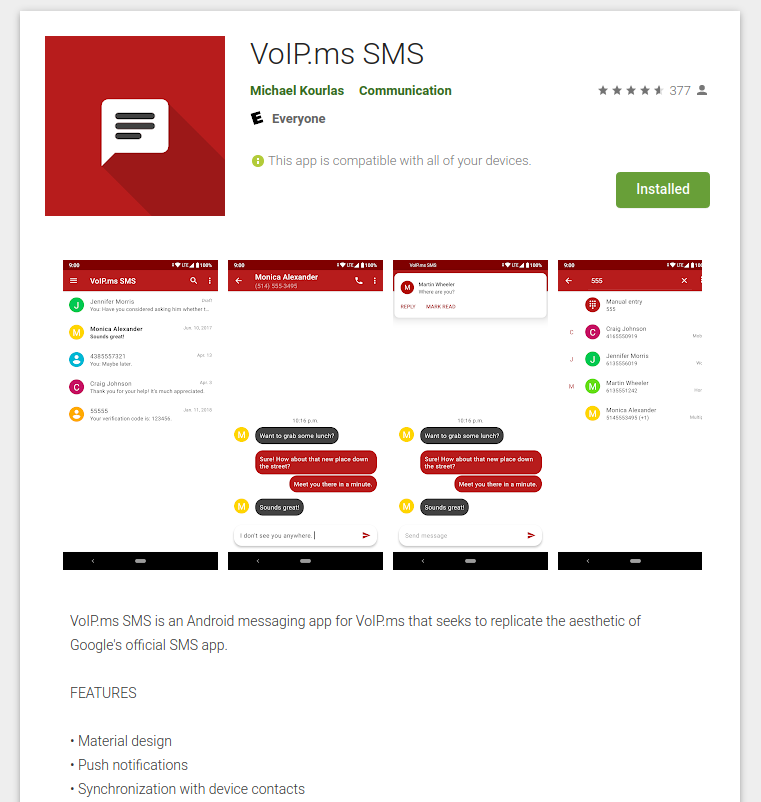
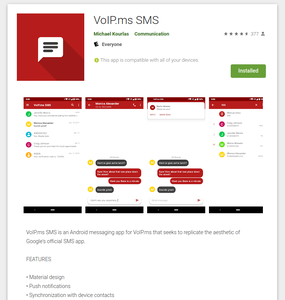
  1. The android application VoIP.ms SMS is an open source project developed by Michael Kourlas, an independent programmer. It only supports SMS, never has done MMS. Also, this application relies on his servers to transfer data – for which I am thankful, because I appreciate the service!
  2. The “legacy” web application, has no MMS.

In both “legacy” programs,

  1. If you try to send a long message, it splits it up automatically, according to the standard.
  2. You can’t send any media.
  3. If someone sends you a long text message, it’s a crap shoot – if it is split up by the sender, the pieces come through. If it isn’t split up, the message is just silently lost.
  4. If someone sends you media, the message is just silently lost.

“New” MMS Support on VoIP.ms

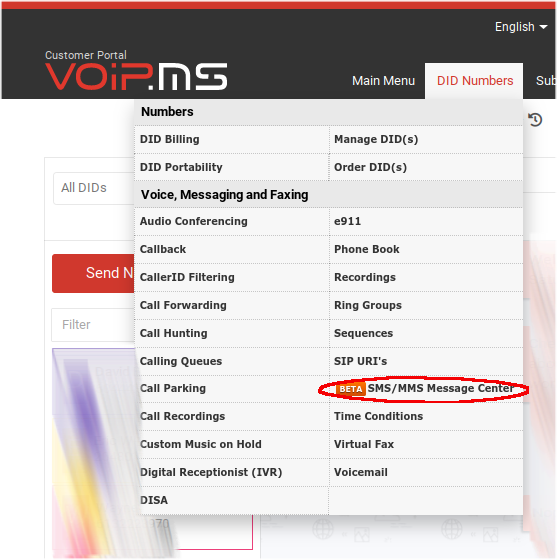
Image of SMS/MMS Menu Entry

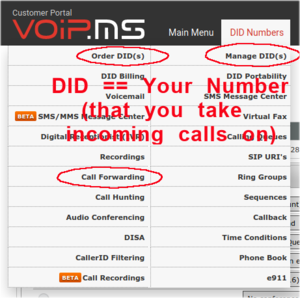
Per above, in August 2020, VoIP.ms started supporting MMS using a new web interface from the main page -> DID Numbers -> SMS/MMS Message Centre, or directly at the SMS/MMS portal. Here, you can do full SMS and MMS send and receive.

The new portal works reasonably well, but it has its quirks:

  • It might display a green dot beside a person’s name if they send you a new message… but it takes a while, and it won’t auto update for you. You have to click on their name again, to get the message to appear.
  • It appears that a refresh is required every night at midnight eastern time. To do this, click DID Numbers -> SMS/MMS Message Center and wait for the refresh.
  • If clicking on the menu item doesn’t work, hit “refresh” in your browser. At times, this will cause a login prompt to be displayed. If you enter your login credentials and it does not appear to do anything, the site is probably doing reverse proxy check – press “return to main site”, login there, and click ID Numbers -> SMS/MMS Message Center again.

Now, can you use VoIP.ms as a “complete” alternative to your cell phone texting? Well… yes, and no.

Android Application Support


The Android app has been updated to support MMS. It appears to be quite reliable. Kick Michael over a bit of cash if you use it and it works well for you.

Not All Providers Can Send to VoIP.ms Text System?


Yes, if it works, then you are away to the races. I use it all the time to keep contact with folks in the US and elsewhere.

The interesting thing is that some texting systems will not send to VoIP.ms text system, not sure why. There is some kind of “provider matrix” used by each telco for delivery of their texts to another telco, and for whatever reason, VoIP.ms isn’t on some lists. For instance, my bank in the USA tries and tries to send SMS texts to my VoIP.ms number to confirm my login, but it never works. The telco automation provider Twilio sometimes has trouble too.

It all seems kind of hit-and-miss. Maybe harassing the VoIP.ms guys would get them to chase it down and get onto those “choice matrix” lists, but I have not tried.

Text Message Provider Matrix


This text message “provider matrix” thing has been around for a long time. Long time ago I found that every telco has an incoming E-mail to text message portal – and found out that you can just carpet bomb all of them with the telephone_number@each_telcoem>telephone_number@each_telco</em. Those telcos who don’t have the specified number will silently ignore. By extension, connection between telcos is probably done the same way. If VoIP.ms were not on the list, then they would not get the message, and would not receive the text.

Other Means of Getting Your VoIP.ms Text Messages


You can also have text messages forwarded to a “real” cell phone, but you do have to remember if you reply that it comes from that “real” cell phone – so your correspondents will send to one number, get back from another. Worse if that number is out of country – you reply, it comes from your “real” cell phone, and you get charged for it.

You can also have incoming text messages bundled into an E-mail, but not sure how you would reply to that.

The Not-So-Secret Secret to Refilling Foaming Hand Soap

SoftSoap Foaming Soap Dispenser

It was expensive, but I purchased a foaming soap dispenser for beside the bathroom & kitchen sinks.  I prefer foaming soap – it just feels better on your hands, it goes further than liquid soap (and has to be filled less frequently), and I believe it actually works better to clean your hands, than does liquid soap.

The challenge came when the dispenser was empty.  There (apparently) is no refill for foaming soap.  Sigh.  All you can get is liquid soap, like below.

Liquid Soap Refill
Liquid Soap Refill

At first, I just filled the foaming soap dispenser up with liquid soap.  That didn’t work at all.

Then, I experimented with dilution of the soap with water.   It works!

Fill the foaming soap dispenser to about 20% level with liquid soap.
Fill to about 80% level with water.
Be sure to leave significant space on top - probably more than you would be inclined to do with just liquid soap! 
Slowly rotate the dispenser to gently mix the soap and water.
Dispense!


Dispenser Marked Up for Fill

America’s best buy for a nickel…

I don’t recall when I first heard that phrase, but it contains such insight.

America’s best buy for a nickel is a telephone call to the right man – Ilka Chase

You cannot know everything.  Don’t even try!  Instead, take the time to cultivate personal and professional relationships with those who expand your horizons, have knowledge complementary (or orthogonal) to your own, and whom you can contact when you need advice, suggestions, or knowledge.

That’s not to say that you shouldn’t strive to be the best, most well rounded expert at what you do!  Rather, there are always going to be areas of knowledge at, or just beyond, the limit of your understanding.   When that happens, don’t guess at it unless you have to – instead, if at all possible, talk to someone who knows that area better than you do.

The brush paints in both directions.  If you are conscientious and diligent in your own area of expertise, then you, in turn, will the a person to whom others turn to, when they need some sage advice in your area.

Don’t use this as an excuse to vacillate: when you have to make a decision, then by all means, decide.  When time frame or circumstances determine that you must make your best stab at a fix, go for it!  But, when you have the time and opportunity to reflect on something just out of your technical grasp, think about who you can contact to give you the advantage you need.  And, don’t hesitate to give similar assistance to others who call upon you.

VoIP.ms SMS and Call Forwarding

So, here is how to set up VoIP.ms for SMS texting and call forwarding.

Important Term “DID”

The first thing to know is a specific term.  DID, or “direct inward dial”, is your telephone number that can be called.  In other contexts, it can mean the phone that will be connected to, when someone dials that number.  In our context, it will just be the number.

Why the distinction?  Outbound calls use a different system.  Simple as that.  Leave that for another time.

Follow the Money?

Bear in mind that, although the base cost for each DID is ridiculously low, nothing is free.  SMS texts cost something like ¾ cent each, inbound and outbound calls cost by the minute (something around 1 cent per minute).  I find this acceptable, because there’s no way that I could ever even come close to the cost of my old phone bill!

Accounting

OK, first thing is to create your account and fund it.  All amounts are in USD.  I would suggest using PayPal to fund it, and I’d suggest putting in US$20 or US$30 to start.  You can set an “alarm” on your account to send an E-mail when your balance falls below a certain amount.

Once you’ve got your account and it is funded, then for the task at hand, here are the main management menu items you will use.

Set Up Call Forwarding Target

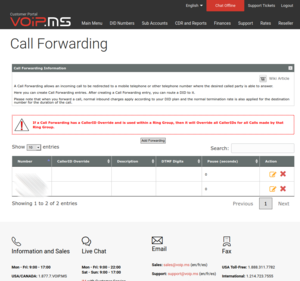
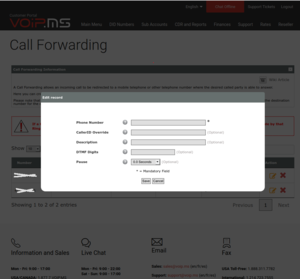
First, set up a call forwarding target.  Select “Call Forwarding” and create an entry pointing to where you want calls to be potentially redirected to.  You can create more than one – you can select which one is the actual target, for each DID.

Here’s a sample entry screen.  You don’t have to touch anything else except to put the 10 digit phone number of the target to forward calls to.

Ordering Arbitrary DID(s)

If you don’t have any DID(s) yet, you will have to go to “Order DID” first, and create them.  The word “order” is a bit of a misnomer, because it’s all automatic and practically immediate.  You can create as many as you want, and it’s quick.  You can pick a telephone number in pretty well any area code in North America, and some numbers overseas.  Be conscious of their cost, they don’t all cost the same in monthly cost or in inbound & outbound per-minute charges.

Porting Your Number In

You can also “port” your existing number from a cell phone or landline phone carrier to VoIP.ms.  It’s a bit of a process – not that hard, you just have to read the procedure and go through the steps.  The telcos are anal about making sure you follow the steps – they are trying to prevent port-out fraud, which has happened in the past, with disastrous consequences – think “SIM hijacking”, not nice.  

Anyway, it is standard practice these days to set a port PIN on any mobile DID.  This is wise to do.  Be sure to keep it private.  If set, then without this PIN, port requests are ignored.  Of course, keep track of that port PIN, or else you won’t be able to perform a port either 😊    Keep these things in your password manager (use LastPass – don’t pass “go”, don’t do anything else – just do it).

When you port your cell phone number, be sure to indicate that it’s a mobile/cell phone.

Managing the DID Settings

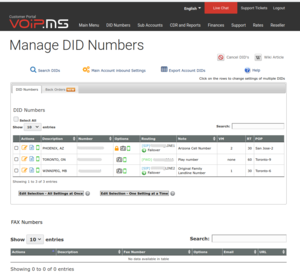
Anyway, once you have any kind of DID in your account , go to “Manage DID(s)”:

On the left, under “Actions”, you will see three coloured icons – an orange pencil & paper (edit this DID settings), a blue paper with lines on it (read-only view this DID settings), and optionally a green cell phone, which indicates that this DID supports SMS & MMS.  

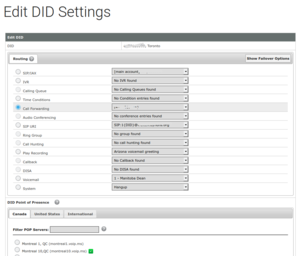
Click the orange pencil & paper icon, which should bring you to this screen:

Select “call forwarding”, and if necessary, drop the selection box and choose where to route the call.

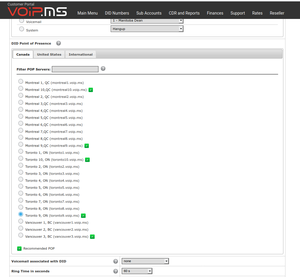
Scroll down and choose the DID point of presence:

This simply is the Internet server location that you will connect to, when you come around to using a VoIP phone.  I would select one close to your primary use location.  You can change it later, but for your VoIP phone to work (inbound and outbound) , your VoIP phone must point to the same server name.

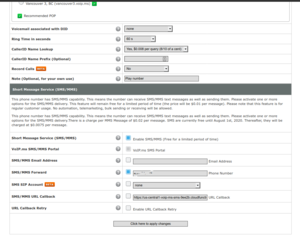
Continue to scroll and you will see the SMS settings.  Above that are a few key settings related to the cost of calls, review each one.  

For SMS, you have to “enable SMS/MMS” and, if you want to SMS/MMS forward, to select this option and put the 10 digit target telephone number in here as well. 

The “SMS/MMS URL Callback” option is for use with the VoIP.ms Android SMS application, see below.  You can leave it unchecked, but the value should be “ https://us-central1-voip-ms-sms-9ee2b.cloudfunctions.net/notify?did={TO } “, per below.

Save the changes, and it should work!

Installation of Android App to Support Near-Native Texting

There are a few limitations, but it works very well for me.  It’s how I keep in touch with my friends in Phoenix (and formerly of Phoenix 😊 ).  I ported my US cell phone number to VoIP.ms and use this app to text with them.

Here is the Android application :

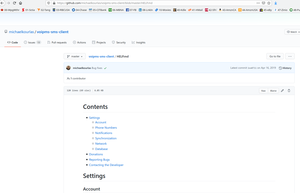
Now, the difficult part – setting it up.  The app is open source, and its help page looks like this:

You have to enter that string into the DID\’s “callback” entry (see above),  then enable the API connection back on VoIP.ms, see below

Enabling the API Connection

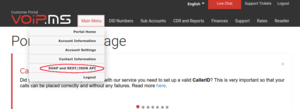
From the VoIP.ms main page, select “Main Menu”, then “SOAP and REST/JSON API”:

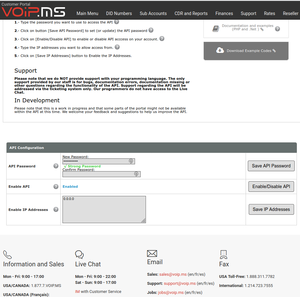
Put in an API password (this will be what you give to the Android app, above), enable the API, and ensure that the “Enable IP Address” is set to 0.0.0.0.  You can restrict the IP address here, if it is well defined and won’t change.

My Yuill Relatives

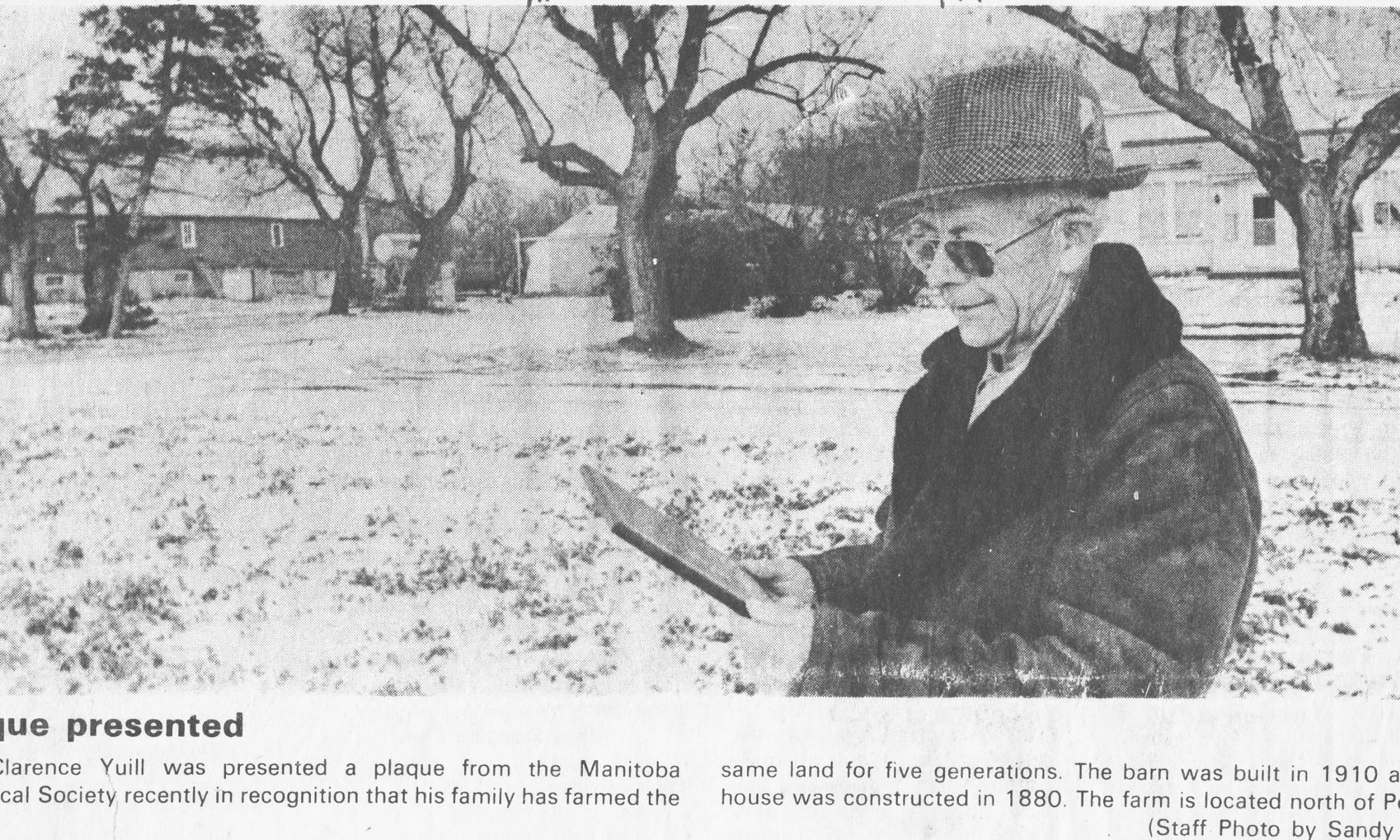
Clarence Alexander Yuill

   Thomas Sissons Yuill

Thomas Yuill


In 1875, Thomas Sissons Yuill was born second son to pioneers, and some of Manitoba’s first Homesteaders, Alexander David Yuill (A.D.) and Willena (Sissons) Yuill.

In 1911, Thomas was a single popular young man and was farming 34-12-7, just north of Portage la Prairie. Along with brother David, the “Yuill Brothers” also owned and worked farmland at Lakeland, owned and worked a wood lot at Riding Mountain, as well as having built themselves a cabin on Lake Manitoba.

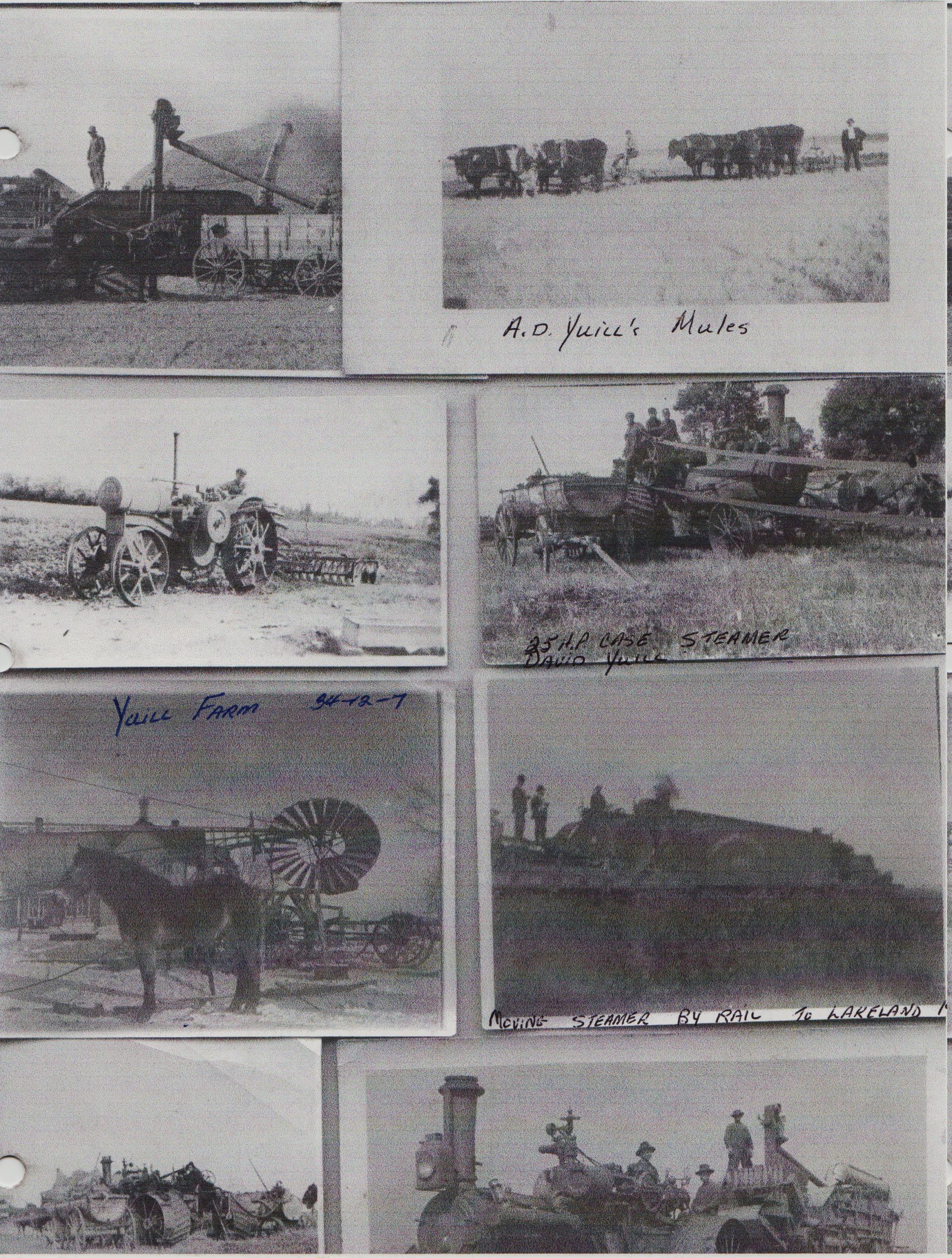
Yuill farm composite


The wood lot kept the “hired hands” busy during the winter months.  Ducks, geese and elk were hunted from the cabin. They could also harvest fish and the ice for the “ice house” from the lake. They did mixed farming – they raised animals as well as doing grain farming. Horses, a small herd of cattle, pigs, and chickens filled the barn. The milk was sold to the creamery, and for a short time, Thomas continued using mules to haul freight between Winnipeg and Portage, as his father had done before him.

In fall these busy farmers would move the thrashing machine to Lakeland by way of the railroad.… which was a daunting, yet necessary, feat!

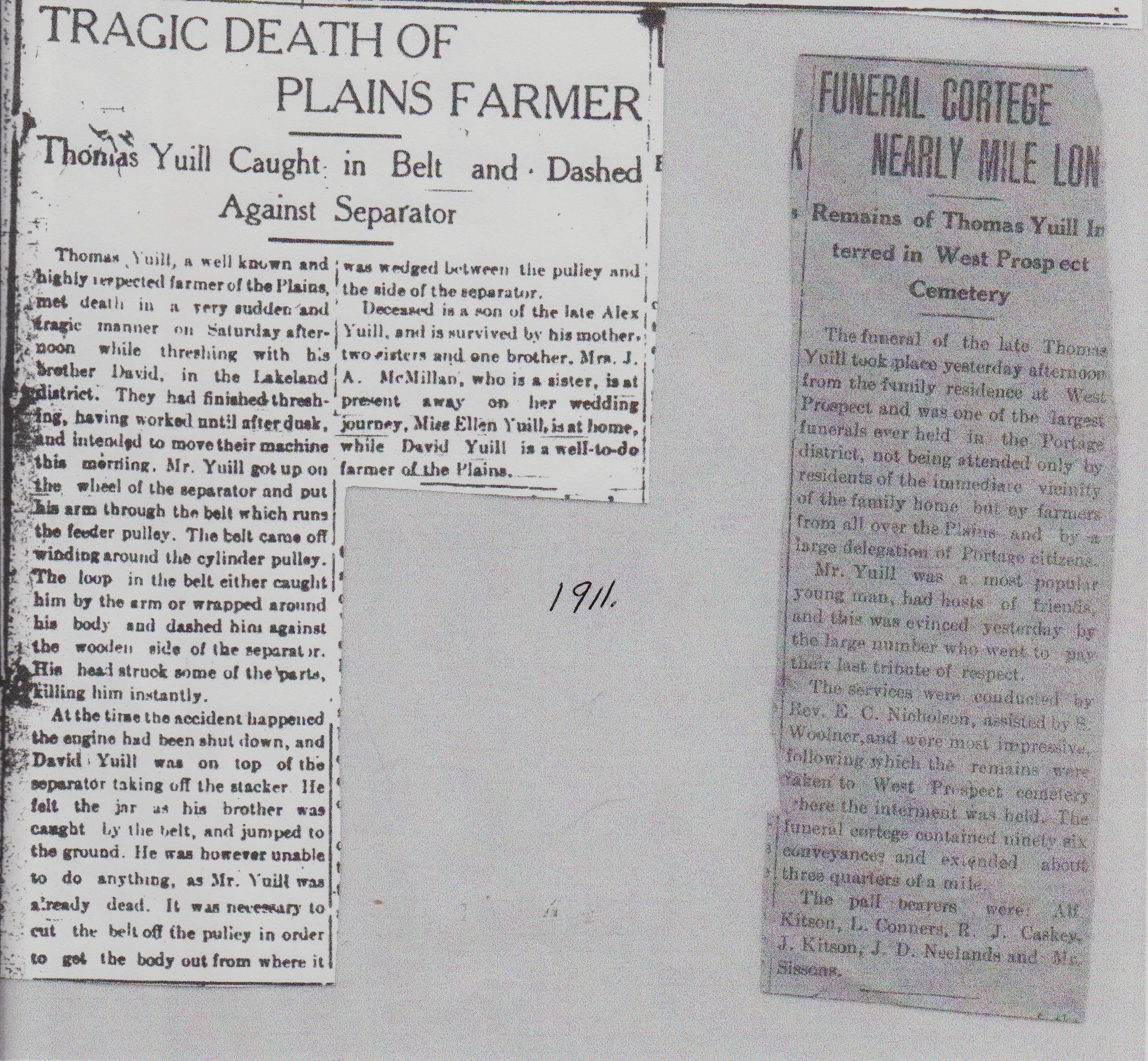
On December 2, 1911, Thomas and David had completed the day’s work when there was a terrible accident.  An account of the incident is noted in the newspaper clipping which follows.

Thomas Yuill death clippings


Thomas is buried in the cemetery on the corner of A.D. Yuill’s land (34-12-7), which his grandfather passed on to the Trustees of the Congregation of the Presbyterian Church in Prospect of Manitoba November 5, 1897.

Pioneer farmers faced many challenges. It was a great feat for a child to reach adulthood. It was a terrible loss when they died in early adulthood.

Clarence Alexander (C.A.) Yuill

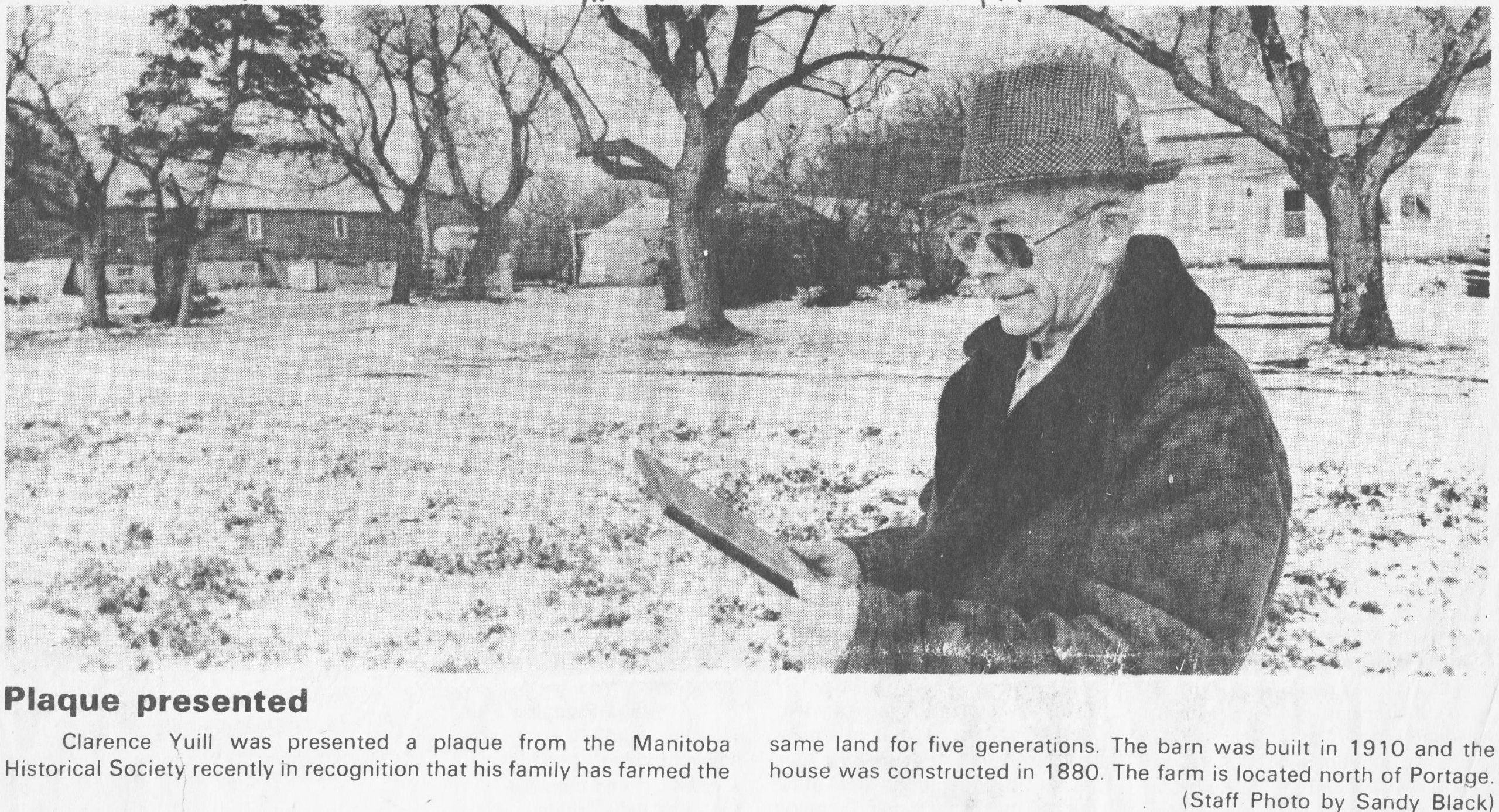
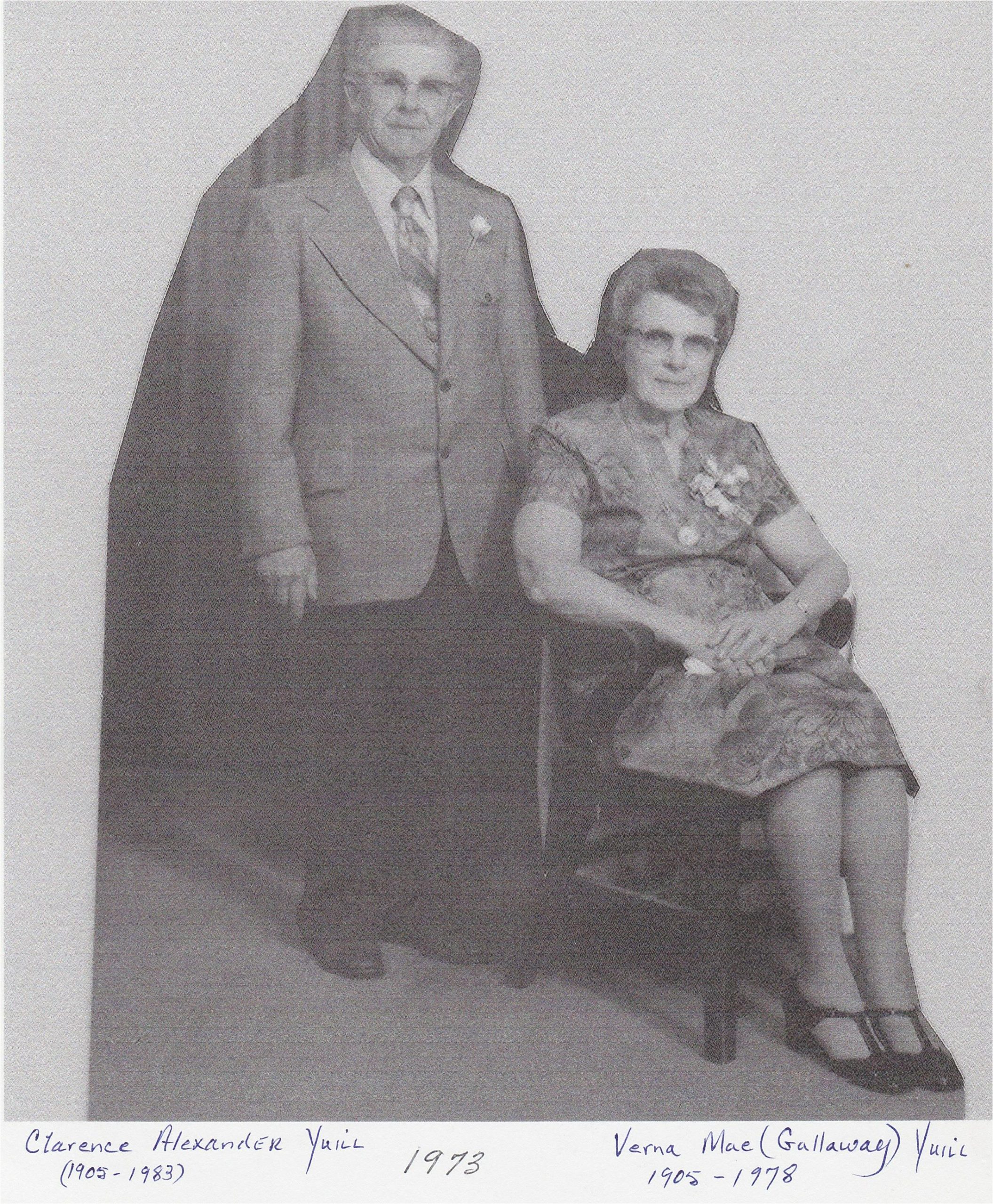
Clarence Alexander Yuill


Clarence Alexander Yuill was born in 1905 to David Williamson Yuill and Annie (Grobb) Yuill, on his grandfather’s homestead north of Portage la Prairie.


Married in 1928 to Verna Mae Gallaway, in the early days they practised mixed farming while they raised their young family. The grain paid the bills, while the animals and garden produce fed the family. You did not eat what you did not grow!

In later years rapeseed, flax, malt barley and sugar beets were added to the traditional grains.

C.A. was a sociable person and kept a busy schedule. He played saxophone and piano. He enjoyed tinkering with radios and machinery, which resulted in the establishment of electricity (his own version of the “Delco-Light”) and running water on the farmstead, far ahead of his peers.

Clarence’s many interests included being a member of the Portage District Plowing Association, member of the Portage Flying Club, trustee of West Prospect School from 1942-1954, then President of (new) Rural School Trustee Association. He worked for four years with the Manitoba Deputy for the Department of Education and the Manitoba Minister of Education to establish a High School for Rural Manitoba students, who until then, could only take High School by correspondence. He was therefore one of the founding members of the Rural Secondary School Board, and was instrumental in obtaining Portage la Prairie St. Mary Parish Hall as the first rural High School room in Manitoba.

Clarence was Councillor (Ward Three) for the RM of Portage la Prairie from 1964-1977, in total spending thirty-five years as a School Trustee and Rural Councillor.

In 1979, C.A. was presented with an engraved Centennial Commemorative Medal by the Manitoba Historical Society.  Recipients were selected for “recognition of personal contribution to the way of life in Manitoba”.

C.A. was a bit of a joker, so Verna had to be on guard… one New Year’s Eve they were returning from a neighbour’s party when Clarence drove past the end of the farm lane. He was driving a new car purchased that afternoon.

“You’ve missed our turn!” stated Verna.

“Here, you drive!” Clarence exclaimed, as he pulled off the steering wheel and handed it to her. It had disengaged from the steering column!!